Spring/Spring Security
Spring Security : Web MVC + Security - 접근 거부 Custom 페이지 생성
Korean Eagle
2020. 5. 17. 18:36
728x90
1. 사용자가 로그인을 성공했지만 권한이 없는 페이지로 접근한 경우 에러 페이지가 보여진다.
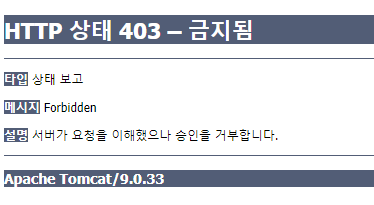
2. 이 페이지를 custom page로 바꾸는 방법에 대한 포스트다.
3. Security Config에 접근 거부가 생긴 경우 전환할 url을 설정한다.
3-1 접근 거부가 발생한 경우 security filters는 설정된 url로 request를 요청하게 된다.
3-1-1 아래 소스의 마지막 줄 .exceptionHandling().accessDeniedPage() 설정의 url을 설정할 수 있다.
package pe.pilseong.springsecurity.config;

import org.springframework.context.annotation.Configuration;
import org.springframework.security.config.annotation.authentication.builders.AuthenticationManagerBuilder;
import org.springframework.security.config.annotation.web.builders.HttpSecurity;
import org.springframework.security.config.annotation.web.configuration.EnableWebSecurity;
import org.springframework.security.config.annotation.web.configuration.WebSecurityConfigurerAdapter;
import org.springframework.security.core.userdetails.User;
import org.springframework.security.core.userdetails.User.UserBuilder;

@Configuration
@EnableWebSecurity
public class SecurityConfig extends WebSecurityConfigurerAdapter {

  @Override
  protected void configure(AuthenticationManagerBuilder auth) throws Exception {
    UserBuilder users = User.withDefaultPasswordEncoder();

    auth.inMemoryAuthentication()
      .withUser(users.username("pilseong").password("pilseong").roles("EMPLOYEE"))
      .withUser(users.username("suel").password("suel").roles("EMPLOYEE", "MANAGER"))
      .withUser(users.username("noel").password("noel").roles("EMPLOYEE", "ADMIN"));
  }

  @Override
  protected void configure(HttpSecurity http) throws Exception {
    http
      .authorizeRequests()
        .antMatchers("/").permitAll()
        .antMatchers("/employees").hasRole("EMPLOYEE")
        .antMatchers("/leaders/**").hasRole("MANAGER")
        .antMatchers("/systems/**").hasRole("ADMIN")
      .and()
      .formLogin()
        .loginPage("/showLoginPage")
        .loginProcessingUrl("/authenticateUser")
        .permitAll()
      .and()
      .logout()
        .logoutSuccessUrl("/")
        .permitAll()
      .and()
      .exceptionHandling().accessDeniedPage("/access-denied");
  }
}
4. Controller에 위에서 설정한 context root /access-denied 요청을 처리할 메소드를 추가한다.
package pe.pilseong.springsecurity.controller;

import org.springframework.stereotype.Controller;
import org.springframework.web.bind.annotation.GetMapping;

@Controller
public class LoginController {
  @GetMapping("/showLoginPage")
  public String showLoginPage() {
    return "plain-login";
  }

  @GetMapping("/access-denied")
  public String showAccessDeniedPage() {
    return "access-denied";
  }
}
5. access-denied.jsp페이지를 적성한다.
<%@ page language="java" contentType="text/html; charset=UTF-8"
    pageEncoding="UTF-8"%>
<!DOCTYPE html>
<html>
<head>
<meta charset="UTF-8">
<title>Access denied</title>
</head>
<body>
  <h1>Company Website</h1>
  <hr>
  <p>
    Access Denied - you are not authorized to access this page
  </p>
  <hr>
  <p>
    <a href="${ pageContext.request.contextPath }/">Back to Landing Page</a>
  </p>
</body>
</html>
5-1 결과 화면은 다음과 같다.

728x90